

Documentation
Schedules and overrides
A schedule says who is on call at any instant. It is built from rotations that hand the duty from one participant to the next at a fixed cadence, in the team’s time zone, and from overrides that put one person on call for a while whatever the rotation says.
What a schedule is made of
- A schedule has a name (letters, digits, dots, underscores and hyphens, up to 100 characters), an IANA time zone such as
America/New_YorkorEurope/Madrid, an optional description, an enabled switch, and one or more rotations. - A rotation has a cadence (daily, weekly or a custom length), a first hand-over instant, an optional end, an ordered list of participants with how many turns in a row each one takes, and optional active hours.
- An override is a person, a start and an end. For that period the override is who is on call, whatever the rotations say.
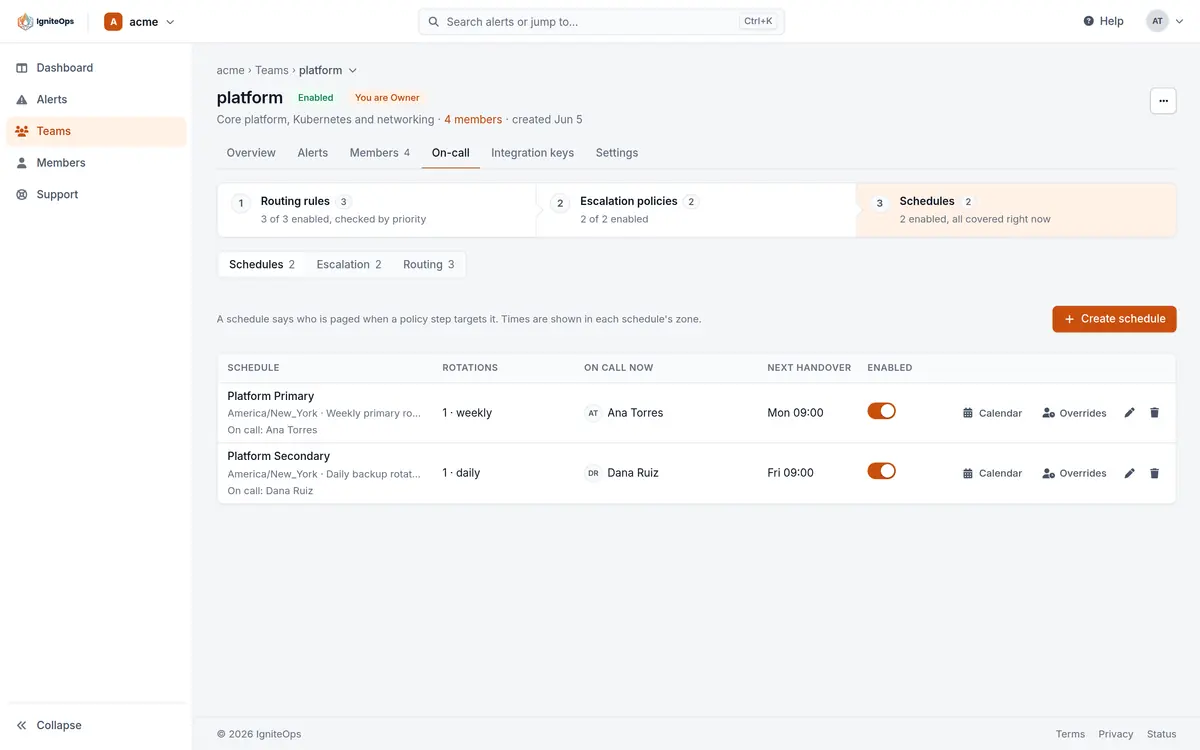
A disabled schedule has nobody on call: an escalation step or a routing rule that targets it pages no one, and its calendar is empty. A team on the Free plan can have 2 schedules, with as many rotations and overrides in each as it needs.
Rotations and hand-overs
The cadence is daily, weekly or custom, from 30 minutes to a year, in whole minutes. The first hand-over is one instant: the first participant goes on call then, and every later hand-over happens one cadence after the previous one. Its local time in the schedule’s zone is the hand-over time: a rotation that first hands over on a Monday at 09:00 hands over every Monday at 09:00 if it is weekly, every day at 09:00 if it is daily.
Rotations run on the schedule’s wall clock, not on a UTC counter. Across a daylight-saving change the hand-over stays at 09:00 local on both sides, and the one shift that spans the change is an hour shorter or longer. On a day the clocks skip the hand-over time, the hand-over happens when they jump (02:30 becomes 03:00). On a day the time occurs twice, it happens at the first occurrence.
An optional end date stops the rotation. A rotation without one runs indefinitely.
Participants and weighted turns
A rotation has from 1 to 50 participants, in hand-over order. A participant can be:
| Type | In the console | Meaning |
|---|---|---|
| user | Member | A member of the team (an Observer cannot be on call). |
| team | Whole team | Every member of a team of the organization is on call for that turn. |
| escalation | Escalation policy | A policy of the same team stands in for that turn: a step that targets the schedule runs the policy instead. |
| none | Nobody (gap) | Nobody is on call for that turn. Useful for a rotation that covers only part of the cycle. |
Each participant takes 1 to 100 turns in a row before the duty moves on. With everyone at 1 the rotation is a plain round robin. With Ana at 2 and Bob at 1, Ana takes two weeks of a weekly rotation and Bob one. The same person may appear more than once in the list.
Active hours
A rotation can be limited to windows of the week, up to 20 of them, each from a day and a time to a day and a time in the schedule’s zone, for example Monday 09:00 to Friday 18:00, or Friday 18:00 to Monday 09:00 for a weekend. Outside its windows the rotation covers nothing: that time is a gap unless another rotation of the schedule covers it. Windows that cross midnight are fine.
Several rotations in one schedule
A schedule holds up to 20 rotations, and every rotation that is active at an instant contributes its participant. Two rotations without active hours put two people on call at once, which is how a primary and a secondary share one schedule. A weekday rotation with business hours and a second rotation with the nights and the weekend split the week between two groups of people. There is no priority between rotations: all of them count.
Overrides
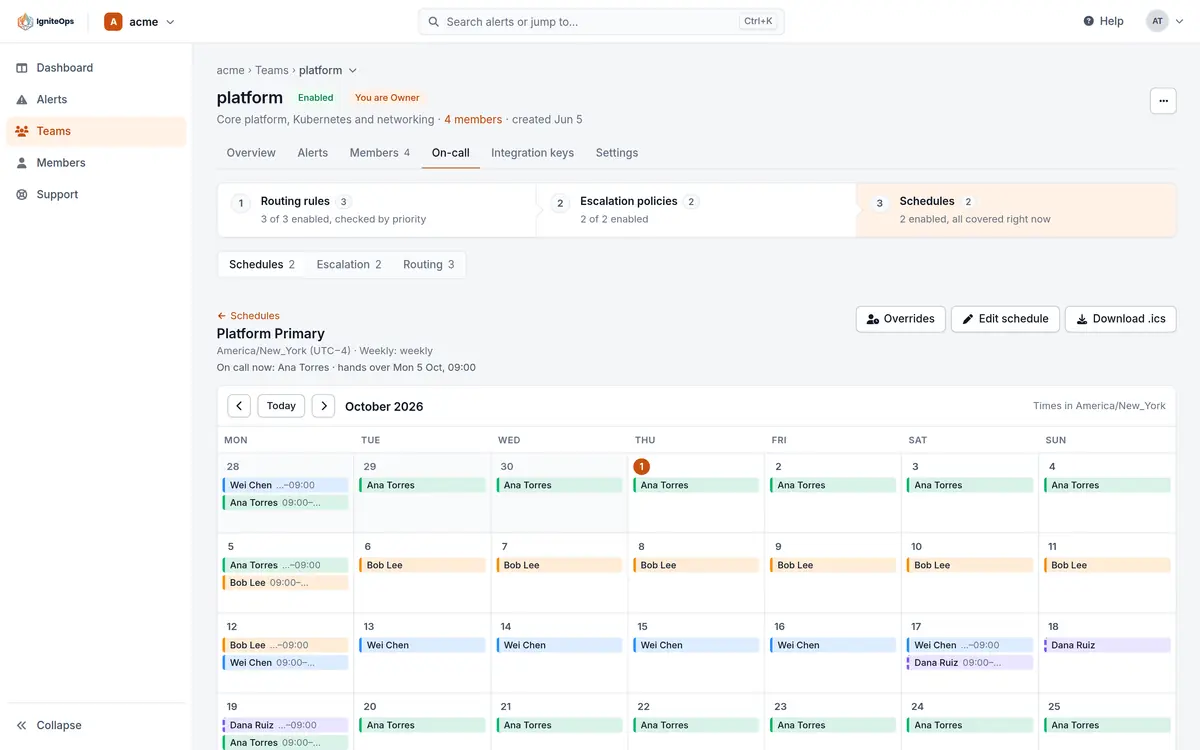
An override puts one member on call from a start to an end, for at most a year, replacing whoever the rotations would have put there. Overrides of one schedule may not overlap each other. The console lists the current and upcoming ones and marks the one that is on call now. Past overrides are kept in the calendar and the .ics file but not in the list.
Team Owners, Managers and Responders can add an override, so a responder can cover a colleague without asking a manager. Deleting one takes an Owner or a Manager. A flow tool can create overrides too: the no-code guide drives a schedule from a shared Outlook calendar this way.
POST …/schedules/{scheduleId}/overrides
{
  "start_time": "2026-11-14T18:00:00Z",
  "end_time": "2026-11-17T08:00:00Z",
  "user_id": "<Dana's user id>"
}
Who is on call
The schedules list, the team overview, the dashboard and the mobile app all show who is on call right now and when the next hand-over is. The API answers the same question for any instant, past or future: GET …/schedules/{scheduleId}/who-is-on-call?at_time=2026-12-24T23:00:00Z returns the participants on call at that moment, each with the end of their shift, and the next hand-over. The escalation engine uses the same calculation when a step targets the schedule, so what the page shows is what gets paged.
The calendar and the .ics export
The calendar is a month view in the schedule’s zone, one colour per rotation, with overrides and gaps marked. Selecting a day lists its shifts. Download .ics writes the shifts as a calendar file, everyone’s or only yours, for the next 1, 3, 6 or 12 months, starting 24 hours ago and with overrides applied, to import into Google Calendar, Outlook or Apple Calendar. It is a one-time download rather than a live subscription: download it again after a change.
The same file comes from GET …/schedules/{scheduleId}/ical?duration_months=3 with a personal API key, up to 12 months and 10,000 shifts. Events are in UTC and marked transparent, so they never block free/busy, and each rotation keeps a stable event identifier across downloads.
Using a schedule in policies and rules
An escalation step or a routing rule can target on call now, next on call or previous on call on a schedule. "Next" is the person who takes over at the next hand-over, which gives you a secondary without a second schedule. A schedule that a policy step or a rule points at cannot be deleted while it is in use: the error names what uses it.
Three patterns
A weekly primary with a built-in secondary
One weekly rotation of the whole team. Policy step 1 targets "on call now", step 2 targets "next on call" after two minutes, step 3 the team. The person who is up next week is this week’s backup.
Business hours and out-of-hours in one schedule
Rotation A, weekly, active Monday 09:00 to Friday 18:00, with the people who work days. Rotation B, daily, active Monday 18:00 to Tuesday 09:00 and so on through the week, plus Friday 18:00 to Monday 09:00, with the people who take nights and weekends. The example below is this schedule.
Follow the sun
Two or three rotations, each with active hours covering that office’s day in the schedule’s zone, each with its own people. Set the hand-over time to the start of the local working day. If a slot would otherwise be empty, add a Nobody (gap) participant or an escalation policy as the participant so that the gap is deliberate and visible on the calendar.
Limits
| Free | Pro | |
|---|---|---|
| Schedules per team | 2 | Unlimited |
| Rotations per schedule | 20 | 20 |
| Participants per rotation | 50 | 50 |
| Turns in a row per participant | 1 to 100 | 1 to 100 |
| Active-hours windows per rotation | 20 | 20 |
| Custom cadence | 30 minutes to 1 year | 30 minutes to 1 year |
| Override length | Up to 1 year | Up to 1 year |
| .ics export | Up to 12 months, 10,000 shifts | The same |
Through the API
POST …/schedules creates a schedule with its rotations, PUT replaces the rotations (a rotation keeps its id, and its calendar events, when the request sends the id back), and the overrides have their own endpoints. A user participant must be a member of the team, a team a team of the organization and an escalation a policy of this team, else the request is refused with the rotation and the participant named.
{
  "name": "platform-primary",
  "timezone": "America/New_York",
  "rotations": [
    {
      "name": "Weekdays",
      "type": "weekly",
      "start_time": "2026-11-09T09:00:00-05:00",
      "participants": [
        { "type": "user", "id": "<Ana's user id>" },
        { "type": "user", "id": "<Bob's user id>" },
        { "type": "user", "id": "<Wei's user id>", "frequency": 2 }
      ],
      "time_restrictions": [
        { "start_day": "monday", "start_time": "09:00", "end_day": "friday", "end_time": "18:00" }
      ]
    },
    {
      "name": "Nights and weekends",
      "type": "daily",
      "start_time": "2026-11-09T18:00:00-05:00",
      "participants": [
        { "type": "user", "id": "<Dana's user id>" },
        { "type": "escalation", "id": "<Business hours policy id>" }
      ],
      "time_restrictions": [
        { "start_day": "monday", "start_time": "18:00", "end_day": "tuesday", "end_time": "09:00" },
        { "start_day": "friday", "start_time": "18:00", "end_day": "monday", "end_time": "09:00" }
      ]
    }
  ]
}Checked against the product on November 8, 2026.