

Documentation
Escalation policies
An escalation policy is the list of steps an alert goes through until someone acknowledges it: who is paged first, who is paged after how many minutes if nobody has answered, and whether the whole list starts again.
Steps and delays
Each step has a delay in minutes, counted from the moment the alert arrived, and one target. A delay of 0 fires at once. The maximum is 10,080 minutes, a week. Two steps with the same delay fire together, which is how one step reaches two targets: give each target its own step at the same minute. A policy needs at least one step.
Delays are absolute, not relative to the previous step: steps at 0, 2 and 5 minutes page at T+0, T+2 and T+5, whatever happened in between, as long as nobody has acknowledged.
The eight targets
| Target | In the console | Who is paged |
|---|---|---|
| schedule | On call now · schedule | Whoever the schedule puts on call at the moment the step fires, overrides included. The usual first step. |
| schedule_next | Next on call · schedule | The person who takes over after the current one. The usual second step: a built-in secondary without a second schedule. |
| schedule_previous | Previous on call · schedule | The person who was on call before the current one. |
| user | Member | One named member of the organization. |
| team | Whole team | Every member of the team, each on their own methods. |
| Email address | Any address, up to 254 characters: a shared mailbox, a ticketing system that creates tickets from email. | |
| webhook | Webhook URL | An HTTP POST with a JSON document describing the alert and the step. Pro. See the integrations page for the payload. |
| slack_channel | Slack channel (incoming webhook) | A formatted message to a Slack incoming webhook (hooks.slack.com/services/…). Pro. |
A schedule target must be an enabled schedule of the same team. A step whose schedule has nobody on call at that minute (a gap, a disabled schedule) pages nobody from that step, and the timeline says so.
Repeating
After the last step, a policy can start again from step 1: every N minutes after the last step, from 1 minute to a week, either up to a number of times (1 to 50) or until the alert is acknowledged. Repeats are a Pro feature. On Free the policy stops after its last step and the alert stays open until someone acknowledges it.
What stops an escalation
- An acknowledgement, from wherever it comes: the console, the app, the notification buttons, the email link, pressing 1 on the call, or the API. The pending steps are cancelled and the timeline records how many.
- Closing or deleting the alert.
- Pressing 2 on the call does the opposite: it skips the wait and fires the next step immediately.
Before every delivery the alert’s status is read again, so a notification is never sent for an alert that was acknowledged a second earlier.
How a step is delivered
- A person is reached on their own notification methods, in the order and with the delays they chose: email at once, then push, SMS and voice as configured.
- A step whose delivery fails for a temporary reason is retried up to five times, with waits of 60, 120, 240, 480 and 900 seconds.
- A direct target that pages nobody (a member with no methods left, a schedule gap) falls back to notifying the whole team, so a misconfiguration becomes a loud page rather than silence.
- The URL of a webhook or Slack step is a credential. It is returned in full only to Owners and Managers who can edit the policy. Everyone else sees it masked.
- A policy that a routing rule targets, or that a schedule names in a rotation, cannot be deleted. The error lists them, so a deleted policy never leaves a rule pointing at nothing.
- A disabled policy pages nobody. Routing skips the rules that target it and applies the next matching rule, or the default team notification.
On the Free plan
| Free | Pro | |
|---|---|---|
| Policies per team | 2 | Unlimited |
| Steps per policy | 3 | Unlimited |
| Repeat | No | Every 1 min to 7 days, up to 50 times or until acknowledged |
| Webhook and Slack steps | No (such a step is skipped) | Yes, included at no charge |
| SMS and voice to responders | No (push and email are used instead) | Yes, per delivery at our rate for the destination |
An example policy
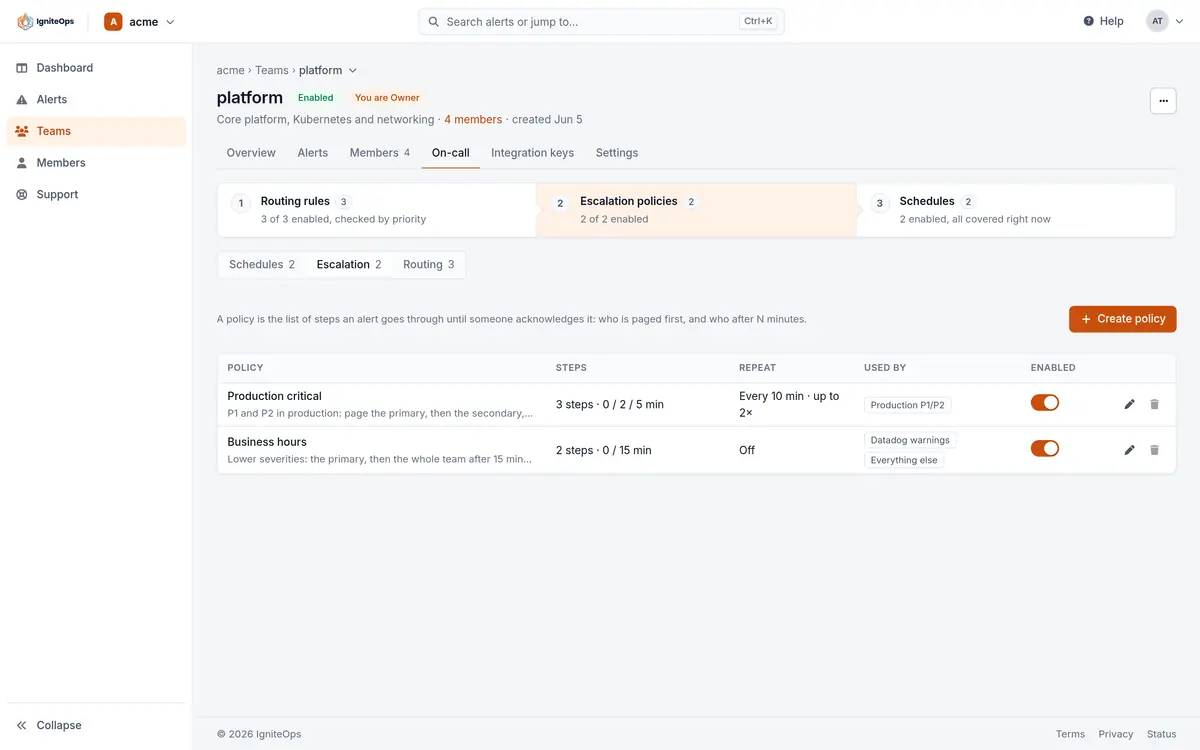
The policy in the screenshots is Production critical: the on-call of the Platform Primary schedule at once, the next person on that schedule after 2 minutes, the whole team and a Slack channel after 5 minutes, and the whole list again every 10 minutes, at most twice. A second policy, Business hours, pages the on-call at once and the team after 15 minutes, with no repeat, and the routing rules send lower severities to it.
Through the API
{
  "name": "Production critical",
  "description": "P1 and P2 in production: the primary, then the secondary, then everyone.",
  "enabled": true,
  "escalation_rules": [
    { "delay_minutes": 0, "target": { "type": "schedule",      "target_id": "<Platform Primary schedule id>" } },
    { "delay_minutes": 2, "target": { "type": "schedule_next", "target_id": "<Platform Primary schedule id>" } },
    { "delay_minutes": 5, "target": { "type": "team",          "target_id": "<platform team id>" } },
    { "delay_minutes": 5, "target": { "type": "slack_channel", "target_id": "https://hooks.slack.com/services/T000/B000/XXXX" } }
  ],
  "repeat_policy": { "enabled": true, "repeat_after_seconds": 600, "max_repeats": 2 }
}Checked against the product on November 8, 2026.