

Documentation
Notification methods
When an escalation step pages you, it does not pick a channel: it pages you, and your own list of methods decides what reaches you, in which order, and how long apart. Every person sets their own list.
Your list of methods
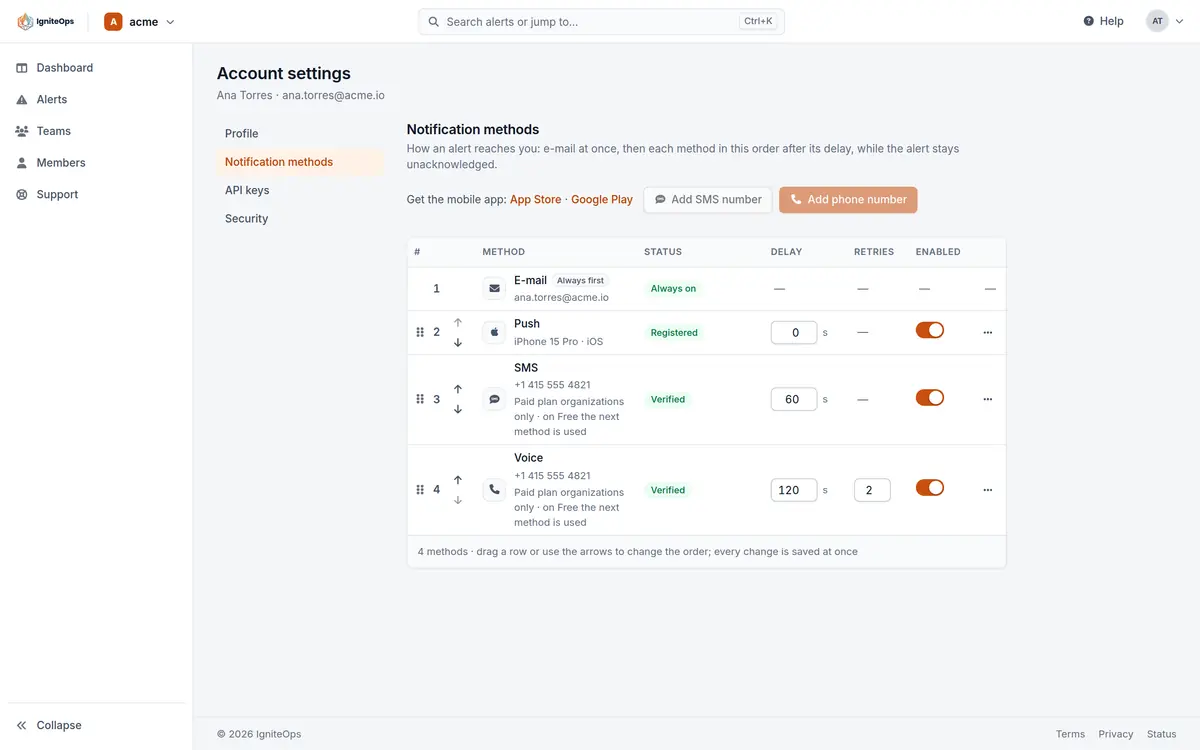
Account settings → Notifications holds one ordered list. Email is always first, always on, and cannot be removed: whatever happens to the other channels, the alert reaches your mailbox at once with an Acknowledge button. Below it come the methods you add: each phone that has the app installed, an SMS number and a voice number.
| Method | What it needs | Notes |
|---|---|---|
| Nothing. It is the address of your account. | Always first, delay 0. Carries a one-time Acknowledge link valid 24 hours. | |
| Push | The iOS or Android app, signed in on that phone. | One entry per phone. Critical on both platforms once you grant the permission. |
| SMS | A verified mobile number. | Pro plan organizations. One SMS number per account. |
| Voice | A verified number that can take a call. | Pro plan organizations. One voice number per account, with 1 to 3 attempts. |
Order and delays
Drag the rows, or use Move up and Move down, to set the order. Each method after email has a delay of 0 to 900 seconds (15 minutes). A method fires at its delay, counted from the moment you were paged, as long as the alert is still unacknowledged. A typical list: email at once, push at once, SMS after 60 seconds, a call after 120 seconds. Acknowledging from any of them stops the rest.
Voice has one more setting: attempts, from 1 to 3 (3 by default). If the call is not answered or nobody presses a key, the phone rings again, with a pause between attempts, while the alert stays unacknowledged.
What each channel sends
- Push: title
🚨 CRITICAL: Database connection pool exhausted on prod-db-01, body the alert’s message. On iOS a critical alert, on Android a notification that lifts Do Not Disturb when you have granted that access. Acknowledge and Close are buttons on the notification. See Mobile apps. - Email: the title, the message, the source, the team and the severity, with an Acknowledge button. The link needs no sign-in, is tied to you and expires after 24 hours.
- SMS: one segment of 160 characters, in plain GSM characters so it fits on any phone:
IgniteOps CRITICAL: Database connection pool exhausted on prod-db-01
Source: Datadog Team: platform Env: production- Voice: a call that reads the alert and waits for a key. Press 1 to acknowledge, press 2 to skip the wait and fire the next escalation step at once. The prompt repeats once.
“This is a call from IgniteOps. You have a critical alert: Database connection pool exhausted on prod-db-01. Press 1 to acknowledge, press 2 to escalate immediately.”Adding a phone number
Numbers are entered in international format: a plus sign, the country code and the digits. A number is verified with a six-digit code sent by text, or read out by a call for a voice number, before it is used. You can request up to 5 codes a day and 10 a week, and hold up to two verified numbers (one SMS, one voice, often the same phone). The mobile app has the same flow under Settings.
Push devices
A phone appears in the list the first time you sign in to the app on it. From the console you can rename it, send a test notification to it, or remove it. Only an explicit sign-out in the app removes the registration by itself: an expired session keeps the phone registered, so the person on call still gets paged.
Free and Pro
On the Free plan SMS and voice are not placed. The methods stay in your list, and when a step reaches one of them the next method is used instead, so a Free responder is paged by email and push. On Pro every call and SMS is billed per delivery at our rate for the destination. A call to a US number is about $0.02 per minute (October 2026). Push and email are unlimited on both plans.
Checked against the product on November 8, 2026.